


Power problems on printed circuit boards are silent profit killers. They don’t always show up as dramatic smoke and fire; more often, it’s intermittent resets, strange test results, or field returns that no one can cleanly explain. Behind the scenes, fingers point in every direction—at the board house, the assembler, the battery, the power‑supply vendor—while schedules slip and costs climb.
The reality is simpler and more useful: most power issues on PCBs follow a small set of patterns, and each pattern has a clear owner. Once you understand how power is sourced, routed, and managed across design, fabrication, assembly, and the power source itself, “mystery failures” start to look very predictable.
This article delves a little deeper and could be used for training or as a checklist.
It is designed to create those “ah‑ha” moments for engineering, operations, and supplier teams, so instead of arguing about who’s at fault, you can see the problem, name it, and fix it.
1. How a PCB Actually Gets Its Power
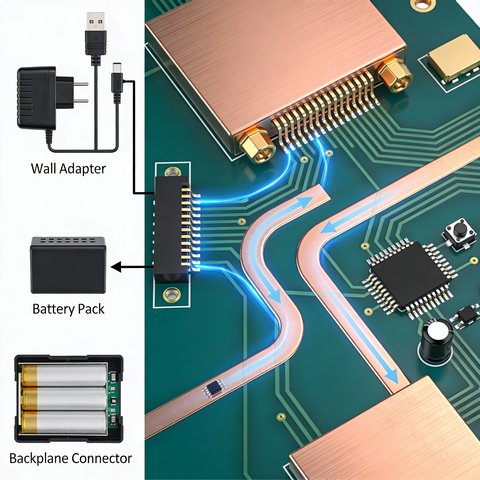 A PCB does not magically create power. It only routes, transforms, and cleans power from elsewhere.
There are two simple layers to think about:
-
-
- The source (off‑board):
- Wall adapter or AC‑DC power supply
- Battery or battery pack
- Backplane or another board in a system
- The distribution (on the board):
- Connectors bring power onto the PCB
- Copper traces and planes move current around
- Regulators, FETs, and power ICs create the rails (5 V, 3.3 V, 1.0 V, etc.)
- Decoupling capacitors and layout keep those rails stable and quiet
- The source (off‑board):
-
If you only remember one thing: the PCB’s job is to deliver the right voltage, at the right time, to the right place, without getting too hot or too noisy.
2. Who Owns What in the Power Chain?
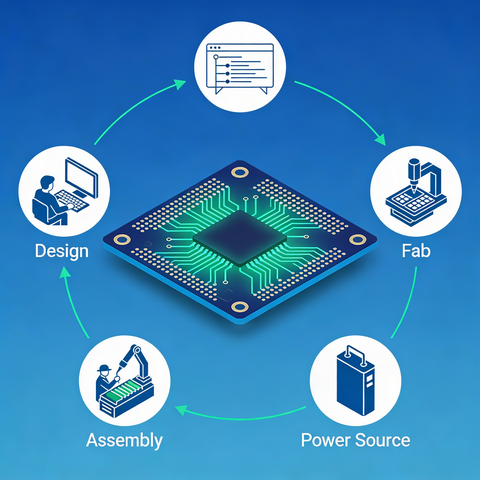 Power problems don’t get solved when everyone says, “It’s somewhere in the chain.” They get solved when each party knows exactly what they own.
Product / System Designer (EE + Layout)
This is where most power integrity success, or failure, starts.
The design team owns:
-
-
- What rails exist (VIN, 12 V, 5 V, 3V3, core, etc)
- How much current each rail needs, and with what margins
- Protection strategy (fuses, TVS, OVP, OCP, isolation)
- Trace, plane, and via sizing for current and temperature
- Creepage and clearance rules for mains and high‑voltage sections
- Placement and routing of regulators, decoupling caps, and grounds
-
If the design is marginal on paper, manufacturing can only build a marginal product faster.
Bare PCB Manufacturer (Fab)
The fab doesn’t design your power system; it is implemented physically.
They own:
-
-
- Copper thickness and uniformity
- Etching quality (are traces and planes the size you think they are?)
- Via drill, plating, and reliability
- Stackup: layer order, materials, dielectric thickness, Tg, etc.
-
If the fab under‑plates vias or over‑etches a plane, you can get hot spots, unexpected IR drop, and early failures, even with a good design.
Assembler (PCBA)
The assembler turns parts + bare boards into a functioning assembly.
They own:
-
-
- Placement and soldering quality for all components
- Reflow profiles that don’t overstress parts or the board
- Voiding, solder bridges, opens, and contamination
- Handling practices (ESD, cleanliness, mechanical stress)
-
If high‑current joints are weak or contaminated, you’ll see intermittent resets, brownouts, or dead units that look like “mystery power problems.”
Battery / Power‑Supply Vendor
The power source defines what the board has to cope with.
They own:
-
-
- Cell or supply quality and safety
- Protection behavior (over‑current, over‑voltage, under‑voltage, temperature)
- Surge, inrush, and short‑circuit characteristics
- Long‑term stability and aging
-
If the pack or adapter sags, shuts down, or misbehaves, even a perfect PCB will look unreliable.
3. The Most Common Power‑Related Fails (In Plain English)
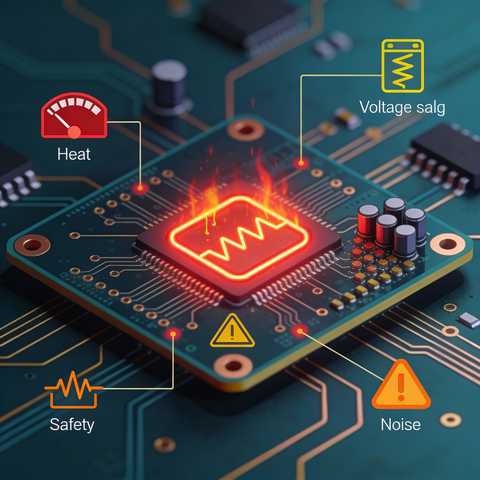 Here are the greatest hits, the recurring patterns that silently kill products.
3.1 Traces That Cook Themselves
-
-
- A high‑current trace is too narrow or too long.
- Current density is high; copper heats up, the board browns, and, over time, the trace cracks or fuses.
- A “neck‑down” in a copper pour acts like an unintended fuse during a surge.
-
Ah‑ha: “We didn’t size copper from a current/temperature standpoint; we sized it to ‘fit the layout.’”
3.2 Rails That Sag or Glitch Under Real Load
-
-
- On the bench, the regulator output looks perfect at its pins.
- At the actual IC, long skinny routes plus a few token vias cause voltage drop.
- When a radio, motor, or processor wakes up, the rail droops or rings.
-
Ah‑ha: “The supply isn’t bad—our distribution is. The chip sees something very different from what we measured at the regulator.”
3.3 Ground That Isn’t Really Ground
-
-
- The ground plane is chopped up by slots, splits, or poor stackup.
- High currents share return paths with sensitive analog or high‑speed signals.
- Local “ground” at a device rises and falls relative to the rest of the board.
-
Ah‑ha: “Our noise issue isn’t the ADC or sensor. It’s the ground we gave them.”
3.4 Decoupling Caps That Look Right, But Don’t Work
-
-
- The schematic shows plenty of decoupling.
- In layout, caps ended up far from the power pins, or on the other side of the PCB with long loops.
- Bulk capacitors are off in a corner, not near the loads they support.
-
Ah‑ha: “We placed caps, but we didn’t engineer the current loops. The layout erased what the schematic promised.”
3.5 Marginal Creepage, Clearance, and Safety
-
-
- High‑voltage regions don’t have enough physical spacing.
- Designers lean on solder mask as a “safety blanket.”
- Pollution, humidity, and dust gradually create leakage paths and eventually cause arcing.
-
Ah‑ha: “It passed early tests, but it was always one humid summer away from tracking and failure.”
3.6 Thermal Corners Cut
-
-
- Power devices (regulators, FETs, power resistors) don’t have enough copper or vias to spread heat.
- In a hot enclosure, or at full load, they run beyond comfort and quietly derate or shut down.
- Heat accelerates solder and material aging around the hot spot.
-
Ah‑ha: “The design worked on a cold bench. It failed in the box we actually ship.”
4. Simple DFM Checks That Catch Most Power Problems
 You don’t need a full PI simulation practice to achieve better outcomes. A focused DFM gate around power makes a huge difference.
4.1 Copper and Current Check
-
-
- List each power rail with its maximum continuous and peak current.
- Check trace/plane widths and copper thickness against a realistic temperature rise.
- Ensure there are no single‑via bottlenecks in high‑current paths; use via arrays for layer transitions.
-
If you can’t show this in a simple table, you’re guessing.
4.2 Spacing and Safety Check
-
-
- Classify nets by voltage level and safety category (mains, high‑voltage DC, SELV, signal).
- Apply creepage and clearance rules for your standards and environment.
- Verify copper‑to‑copper and copper‑to‑edge spacing with real fab capabilities and some margin.
-
If a spacing only “works” because of solder mask, it does not really work.
4.3 PDN and Decoupling Placement Check
-
-
- Ensure every power pin has a decoupling capacitor close by, on the same side whenever possible, with tight loops to its reference plane.
- Place bulk caps near major load groups and regulators, not wherever there’s leftover space.
- Keep continuous reference planes under high‑di/dt loops, with stitching vias where returns must cross gaps.
-
If decoupling is “somewhere nearby” instead of “tight and intentional,” expect noise and resets later.
4.4 Thermal Check for Power Devices
-
-
- Identify all components that dissipate significant power.
- Verify copper area, thermal vias, and airflow support their worst‑case conditions.
- Consider enclosure temperature, duty cycle, and mounting orientation—not just room temperature.
-
If there is no rough junction‑temperature estimate for key parts, you don’t really know if they’re safe.
5. A Simple Way to Stop the Blame Game
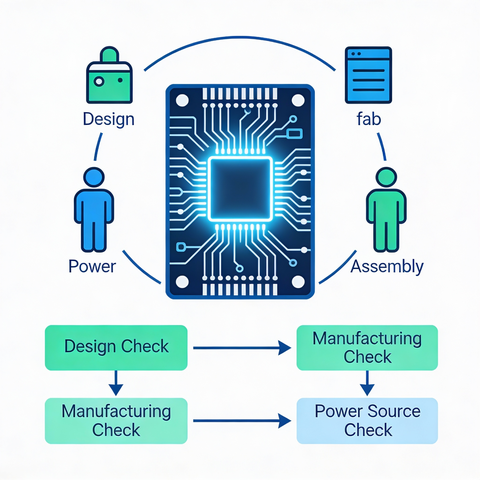 When a power failure shows up in the field, use this short flow to drive clarity:
-
-
- Is the design sound on paper?
- Are copper, clearances, decoupling, and thermals all justified with basic math or rules?
- If not, the issue is design‑owned, regardless of who built it.
- Do multiple CMs/fabs show the same failure?
- If yes, strongly suspect design.
- If no, compare the “good build” and “bad build” processes—likely assembly or fab.
- Does the problem track a specific supply or battery?
- If the symptom appears only with certain adapters or packs, examine power source behavior and integration.
- Watch inrush, voltage sag, and protection trips.
- What does the physical failure look like?
- Burned trace → copper sizing or fabrication.
- Cracked, dull, or voided joints on power parts → assembly and thermal cycling.
- Random resets under load with no visible damage → PDN layout, decoupling, or marginal source.
- Is the design sound on paper?
-
When everyone shares this mental model, conversations shift from “whose fault is it?” to “where in the chain is the root cause, and what’s our fix?”
Power integrity is not magic, and it’s not luck. It’s the direct result of how clearly you define responsibilities, how honestly you check the design against physics, and how consistently your manufacturing partners execute their part of the plan. When design teams, fabs, assemblers, and power‑source vendors share a common mental model of how power should behave on the PCB, most of the drama around “random” failures simply disappears.
If you recognize your own products in any of the patterns in this article, that’s a good thing, it means you’ve just found a handle you can pull on. Use the checklists and questions here as a shared language with your internal teams and your contract manufacturers.
If you want a second set of eyes on a design, layout, or manufacturing plan before you commit to volume, MaRCTech2 and our premier manufacturers can help you move from “we hope it’s fine” to “we know why this will work in the field.”

%202.png)